
Website speed is one of the most commercially important technical factors in modern digital marketing — and one of the most consistently neglected. A slow website costs you rankings, conversions, and revenue every single day it remains unaddressed. Website speed has been a confirmed Google ranking factor since 2010 for desktop and since 2018 for mobile, and its influence on both search engine performance and user experience has only grown since then. In 2026, website speed is not a nice-to-have technical improvement — it is a business-critical priority.
The relationship between website speed and business outcomes is direct and measurable. Google’s own research shows that as website speed drops from one second to three seconds, the probability of a user bouncing increases by 32%. By five seconds, that bounce probability has increased by 90%. Every second of unnecessary load time on your website is actively driving potential customers away before they have even seen what you offer. Investing in faster load times is one of the highest-return activities any business can invest in — and unlike SEO content or paid advertising, the improvements are permanent until something changes on your site.
This guide covers the most effective and immediately actionable strategies for improving website speed, from basic quick wins to technical optimisations that can transform a sluggish site into a high-performance one. Whether you manage your website yourself or work with a developer, these improvements will make a measurable difference to your rankings, your user experience, and your bottom line.
Need expert help improving your website speed and overall performance? Tasknestly’s web development specialists audit and optimise your site for speed, SEO, and conversion performance. Get your free quote today.
Your Site Should Be Converting More
Small fixes only go so far — Tasknestly builds and optimizes full websites designed to convert visitors into customers.
Get Website Services →Table of Contents
Why Website Speed Matters for SEO in 2026
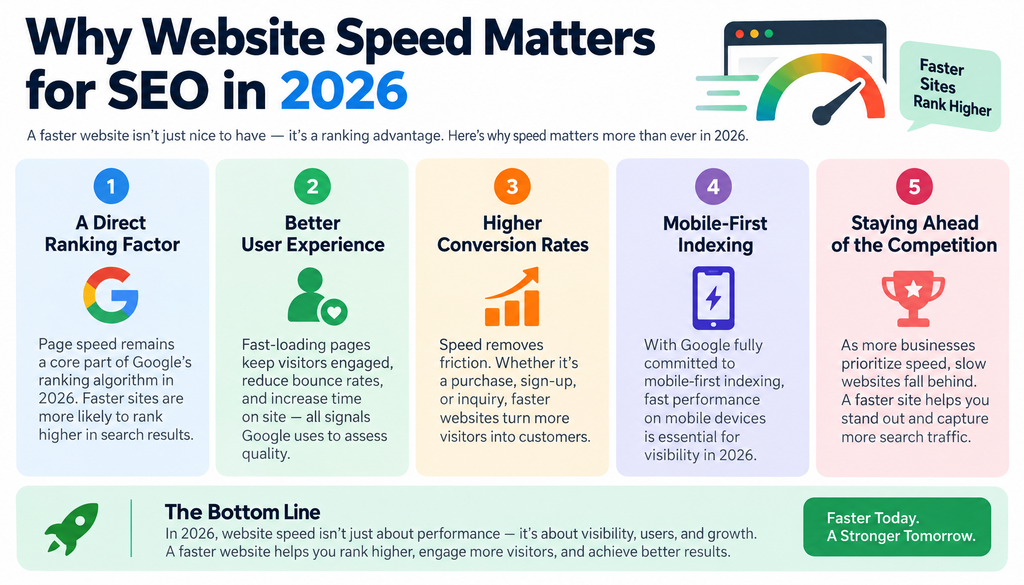
Understanding why website speed matters for SEO requires understanding how Google evaluates and ranks pages. Website speed is a direct input into Google’s Core Web Vitals — the set of user experience metrics that Google uses as ranking signals across both mobile and desktop search. Poor scores on Core Web Vitals metrics like Largest Contentful Paint (LCP), First Input Delay (FID), and Cumulative Layout Shift (CLS) can actively suppress your rankings regardless of how strong your content, backlinks, or on-page SEO are.
Core Web Vitals and Website Speed
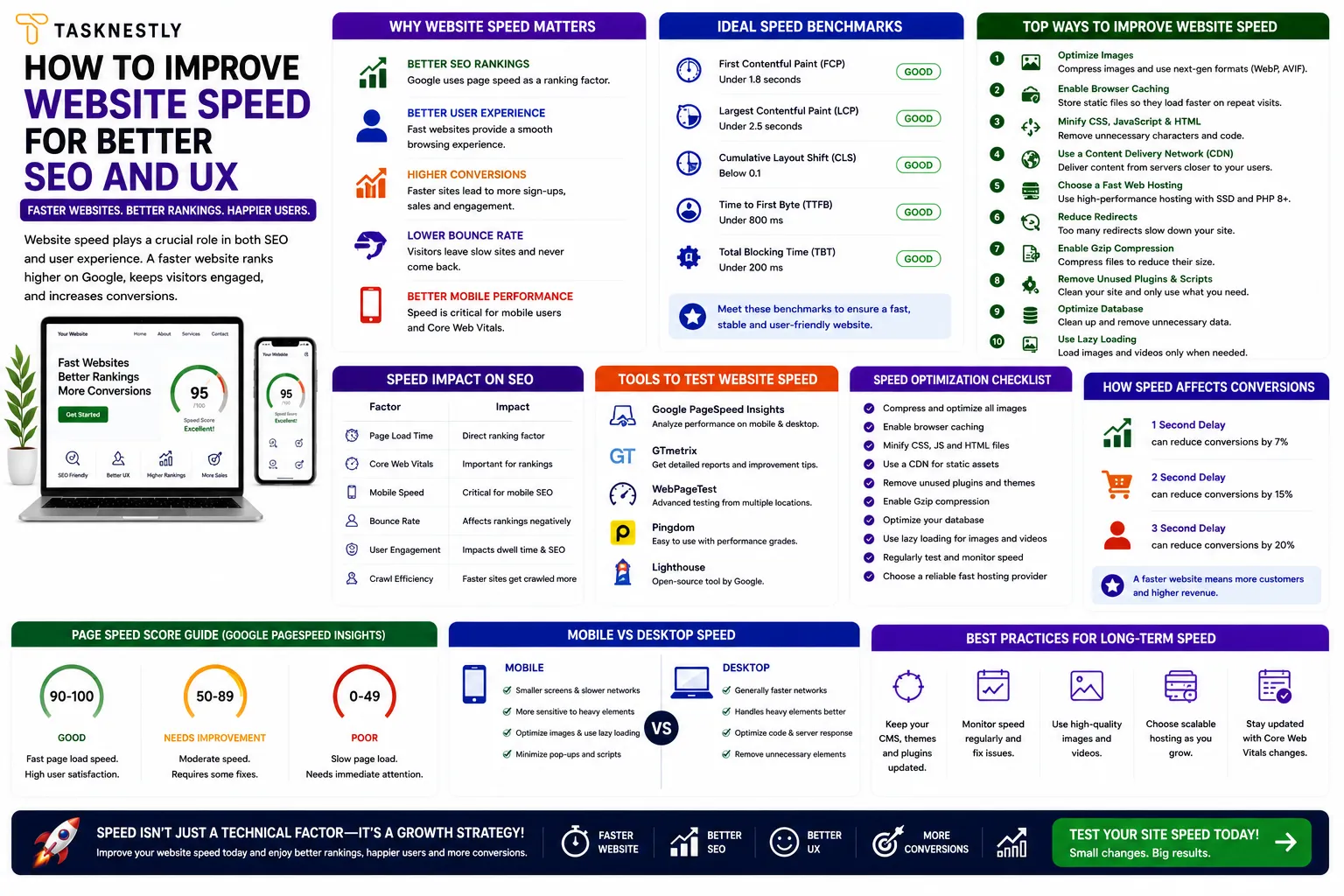
Core Web Vitals are the specific website speed and experience metrics Google measures and incorporates into its ranking algorithm. Largest Contentful Paint measures how quickly the main content of a page loads — Google considers under 2.5 seconds as good. First Contentful Paint measures how quickly the first visual element appears. Cumulative Layout Shift measures how much the page layout shifts as it loads — which is directly affected by website speed and asset loading order. Improving page load performance to meet Core Web Vitals thresholds is one of the most impactful SEO improvements available for most websites in 2026.
Website Speed and User Experience
Beyond SEO, page load time has a profound impact on user experience and conversion rates. Visitors who encounter a slow website do not wait — they leave and find a faster alternative. Faster loading reduces bounce rate, increases time on site, improves the number of pages visited per session, and directly increases conversion rate. These improvements feed back positively into your SEO performance as well, since Google tracks engagement signals like dwell time and bounce rate as indirect quality indicators. A faster site creates a virtuous cycle of better UX, better engagement signals, better rankings, and more traffic.
Your Site Should Be Converting More
Small fixes only go so far — Tasknestly builds and optimizes full websites designed to convert visitors into customers.
Get Website Services →Website Loading Speed Tips: The Quick Wins
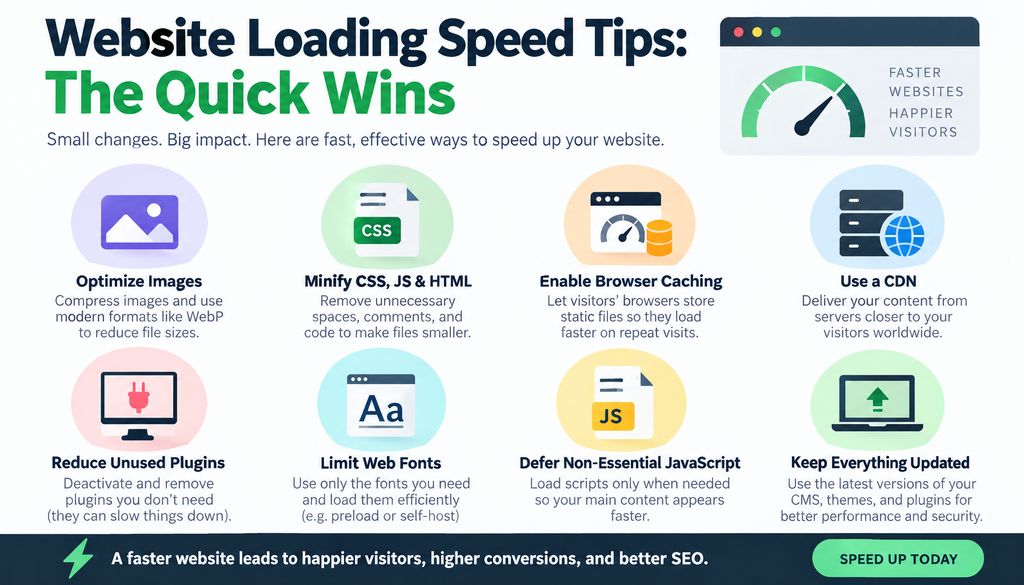
Before diving into more technical website speed improvements, there are several high-impact quick wins that most websites can implement immediately — often without developer involvement — and see measurable website speed improvements within hours.
Compress and Optimise Images
Images are the most common cause of slow website speed. Unoptimised, high-resolution images loaded directly from a camera or design tool can be many megabytes in size — far larger than necessary for web display. Compressing and properly sizing images, converting them to next-generation formats like WebP (which offers 25–35% smaller file sizes than JPEG at equivalent quality), and implementing lazy loading (so images below the fold only load when the user scrolls to them) are among the most impactful website loading speed tips available.
Tools like TinyPNG, Squoosh, and ShortPixel make image optimisation straightforward for non-developers. WordPress users can install an image optimisation plugin that handles compression automatically on upload. This single change often reduces total page weight by 40–60% on image-heavy sites.
Enable Browser Caching
Browser caching is one of the most effective website loading speed tips for returning visitors. When browser caching is enabled, elements of your page — images, CSS files, JavaScript — are stored locally in the visitor’s browser after their first visit, meaning subsequent page loads are dramatically faster because the browser does not need to download those elements again. Most caching can be configured through your server settings, a CDN, or a caching plugin if you are using WordPress. Browser caching has zero impact on first-time visitors but significantly improves the experience for returning ones.
Use a Content Delivery Network (CDN)
A Content Delivery Network dramatically improves website speed for visitors who are geographically distant from your server. A CDN stores copies of your website’s static assets — images, CSS, JavaScript — on servers distributed around the world, and serves them from the location closest to each visitor. For websites with international audiences, implementing a CDN is one of the most effective steps for global performance available. Cloudflare offers a free CDN tier that provides meaningful website speed improvements for most small to medium websites.
Your Site Should Be Converting More
Small fixes only go so far — Tasknestly builds and optimizes full websites designed to convert visitors into customers.
Get Website Services →Improve Page Speed for SEO: Technical Optimisations
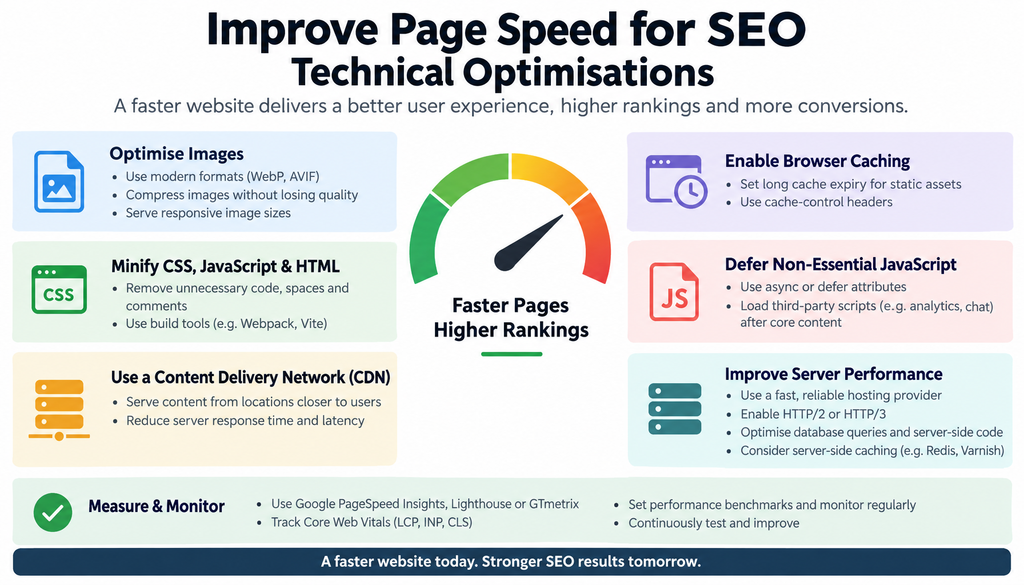
Beyond the quick wins, more technical website speed improvements address the underlying causes of poor performance at a code and server level. These slow website fixes may require developer involvement but typically produce the most significant website speed gains.
Minimise and Defer JavaScript
JavaScript is often the biggest culprit behind poor website speed on modern sites. Large, unoptimised JavaScript files block the rendering of your page — meaning the browser cannot display any content until the JavaScript has been downloaded and processed. Minimising JavaScript (removing whitespace and comments to reduce file size), deferring non-critical JavaScript (loading it after the main page content), and removing unused JavaScript altogether are among the most impactful technical changes a developer can implement.
Reduce Server Response Time
Website speed is also determined by how quickly your hosting server responds to requests. A slow server response time — technically called Time to First Byte (TTFB) — adds latency before a single byte of your page is delivered to the visitor’s browser. Improving TTFB is a critical performance step that often requires either upgrading your hosting plan to a faster server, switching to a higher-quality hosting provider, or implementing server-side caching to reduce the processing time of dynamic requests.
Eliminate Render-Blocking Resources
Render-blocking resources are CSS and JavaScript files that prevent the browser from rendering your page until they have been fully loaded. Identifying and addressing render-blocking resources is one of the most technical but most impactful fixes available available. This typically involves restructuring how CSS and JavaScript are loaded — loading critical CSS inline, deferring non-critical CSS, and using async or defer attributes on JavaScript files to prevent them from blocking page rendering.
Want your website audited and optimised for speed, SEO, and conversions? Tasknestly’s website development team and SEO specialists work together to deliver technical improvements that improve both website speed and search performance. Request your free quote.
Your Site Should Be Converting More
Small fixes only go so far — Tasknestly builds and optimizes full websites designed to convert visitors into customers.
Get Website Services →Website Performance Optimization: Measuring and Monitoring Speed

Improving performance optimisation is not a one-time task — it requires ongoing monitoring to catch regressions and identify new opportunities as your site evolves. These website performance optimisation practices help you maintain strong speed scores over time.
Use Google PageSpeed Insights
Google PageSpeed Insights is the most authoritative free tool for assessing your website speed and identifying specific improvements. It measures your Core Web Vitals scores, provides a performance score out of 100 for both mobile and desktop, and gives specific, prioritised recommendations for website speed improvements. Running PageSpeed Insights monthly on your key pages is one of the most effective practices for staying on top of performance over time.
Monitor Speed After Every Site Update
Site performance can degrade silently after updates — new plugins, theme changes, added images, or third-party scripts can all negatively impact website speed without anyone noticing until a performance audit reveals the problem. Building performance monitoring into your post-update workflow is one of the most important website performance optimisation habits a development team can adopt.
Mobile Website Speed Deserves Special Attention
Mobile page speed is weighted more heavily in Google’s ranking algorithm than desktop speed, yet many businesses focus their website performance optimisation efforts primarily on desktop performance. In 2026, with mobile traffic accounting for the majority of web sessions globally, mobile performance must be treated as the primary target. Test mobile separately from desktop, and treat any mobile score below 80 as an urgent priority.
Your Site Should Be Converting More
Small fixes only go so far — Tasknestly builds and optimizes full websites designed to convert visitors into customers.
Get Website Services →Slow Website Fixes: Common Problems and Solutions
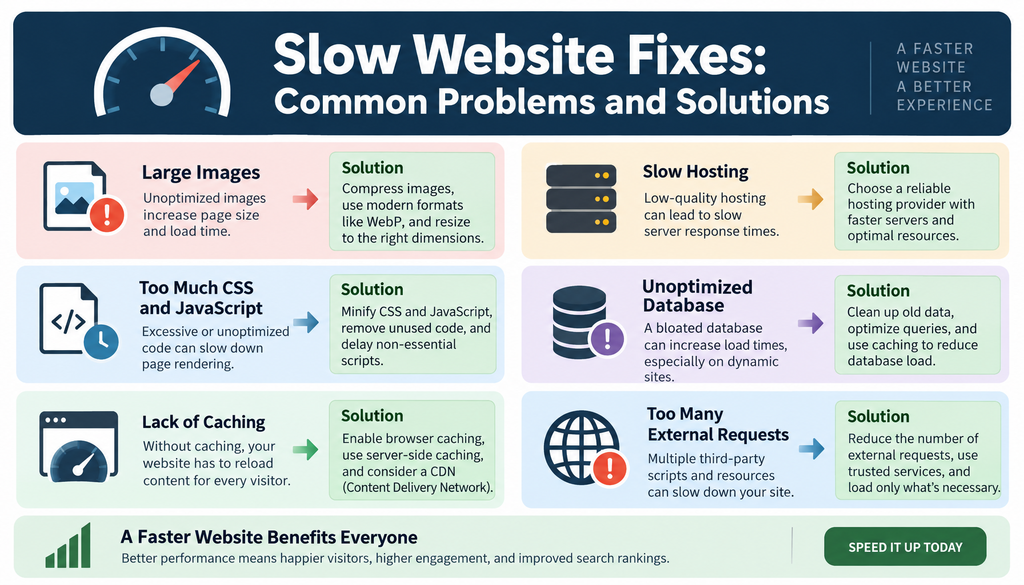
Many businesses have specific, identifiable causes of poor website speed that are straightforward to address once diagnosed. These are the most common slow website fixes that deliver the greatest website speed improvements for the time invested.
Poorly chosen hosting is responsible for slow website speed on more small business sites than any other single factor. Shared hosting plans — where your site shares server resources with hundreds or thousands of other sites — produce unpredictable and often poor website speed under traffic load. Upgrading to a managed WordPress host, a VPS, or a dedicated server is one of the most effective fixes for businesses on budget hosting plans that have outgrown them.
Too many plugins is another common cause of slow load times. Each plugin adds code and database queries that increase load time. Auditing your plugins and removing any that are unused, redundant, or replaceable with lighter alternatives requires no technical skill and can produce significant gains and can produce significant gains.
Unoptimised fonts are an often-overlooked cause of poor performance. Loading multiple font weights and styles from Google Fonts or other external sources adds multiple HTTP requests and can noticeably impact website speed on mobile connections. Limiting your font choices, using system fonts where appropriate, and preloading your most critical font files are effective approaches for reducing font-related load overhead.
Combining these technical website speed improvements with a well-structured digital marketing strategy and SEO services creates a compounding effect where faster pages rank higher, attract more traffic, and convert that traffic at a higher rate — delivering significantly better commercial outcomes than any of these improvements in isolation.
Your Site Should Be Converting More
Small fixes only go so far — Tasknestly builds and optimizes full websites designed to convert visitors into customers.
Get Website Services →Website Speed Benchmarks: What You Should Be Aiming For
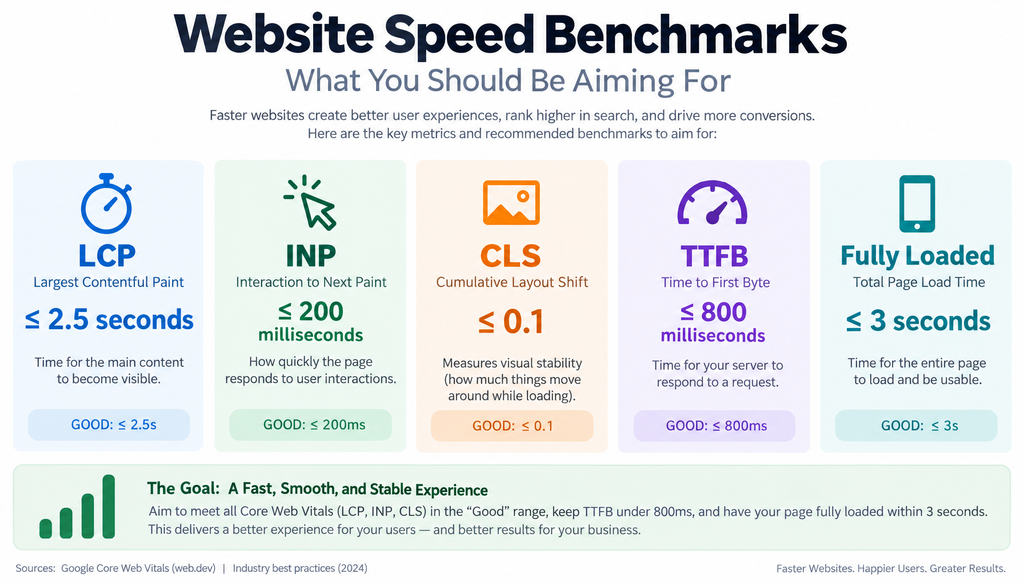
Before you can improve website speed meaningfully, you need to know what good looks like. These are the benchmarks that leading web performance standards set for each key metric in 2026.
For Largest Contentful Paint — how quickly your main content appears — under 2.5 seconds is the target for a green rating in Google’s Core Web Vitals. Between 2.5 and 4.0 seconds needs improvement. Above 4.0 seconds is considered poor and is likely impacting rankings. For First Input Delay (or Interaction to Next Paint in newer versions), under 200 milliseconds is good. For Cumulative Layout Shift, under 0.1 is the target.
For overall PageSpeed Insights score, a score of 90 or above on both mobile and desktop is the benchmark to aim for. Most well-optimised small business websites can achieve scores in the 85 to 95 range with the improvements in this guide. Scores below 50 on mobile are common on unoptimised sites and represent a significant SEO and UX liability that should be treated as urgent.
Your Site Should Be Converting More
Small fixes only go so far — Tasknestly builds and optimizes full websites designed to convert visitors into customers.
Get Website Services →Website Speed and Its Impact on Paid Advertising Performance
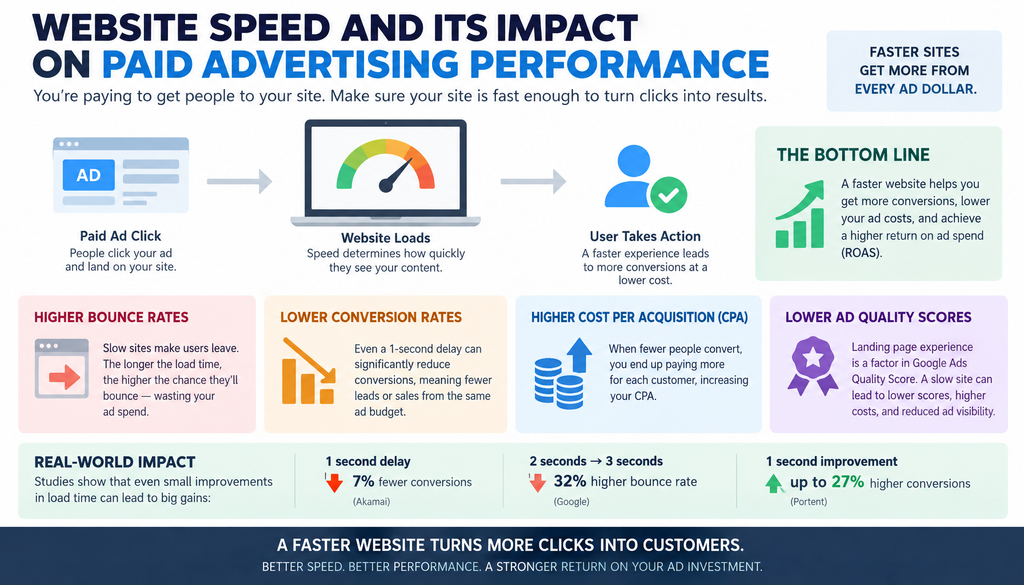
One of the most underappreciated dimensions of website speed is its direct impact on the performance of paid advertising campaigns. If you are running Google Ads, Meta Ads, or any other paid traffic to your website, your website speed is actively determining how much value you extract from every pound of ad spend — and poor performance can silently waste a significant proportion of your advertising budget.
Google’s Quality Score — the metric that determines how much you pay per click and where your ads appear — is influenced by the landing page experience that your ad traffic delivers. A slow landing page creates a poor user experience that lowers your Quality Score, which in turn increases your cost per click and reduces your ad placement. Improving website speed specifically on your paid landing pages can directly reduce your cost per acquisition without changing your bids or your ad creative.
The same principle applies to Meta Ads. When users click through from a Facebook or Instagram ad and encounter a slow page, they leave before converting. Meta’s algorithm tracks post-click engagement behaviour and delivers your ads to audiences less likely to bounce if your landing page consistently drives immediate exits. Improving website speed on your ad landing pages signals positive post-click engagement and improves your ad delivery quality over time.
For businesses investing in SEO through professional SEO services, the connection between website speed and organic ranking is equally direct — as covered earlier in this guide. And for ecommerce businesses, improving website speed on product pages and checkout flows is one of the highest-ROI technical investments available, since even small improvements in checkout load time produce measurable increases in completed transactions. Tasknestly’s ecommerce solutions always include website speed optimisation as a foundational component of the build.
Top Tools to Help You Improve Website Speed
- Google PageSpeed Insights — Free, authoritative tool that scores your website speed against Core Web Vitals and provides specific, prioritised optimisation recommendations for both mobile and desktop.
- GTmetrix — Detailed website speed analysis tool that breaks down every element contributing to your load time, with waterfall charts that make it easy to identify the biggest bottlenecks.
- Cloudflare — Free CDN and performance platform that improves website speed for global visitors through asset caching, image optimisation, and server response time improvements.
Your Site Should Be Converting More
Small fixes only go so far — Tasknestly builds and optimizes full websites designed to convert visitors into customers.
Get Website Services →Frequently Asked Questions: Website Speed
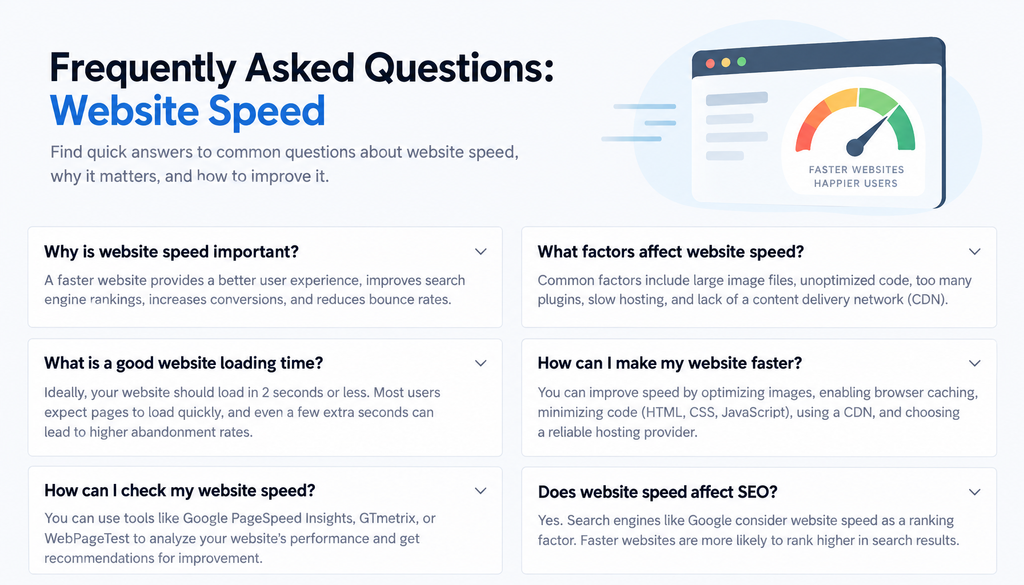
| Question | Answer |
|---|---|
| How does page load speed affect SEO? | Page load speed is a direct Google ranking factor through Core Web Vitals. Poor website speed suppresses rankings regardless of content quality. Hitting Core Web Vitals thresholds is one of the highest-impact technical SEO improvements available. |
| What is a good page speed score? | Google PageSpeed Insights scores performance from 0 to 100. A score of 90 or above is considered good. Scores between 50 and 89 need improvement. Scores below 50 are considered poor and are likely affecting both rankings and user experience negatively. |
| How do I check my website speed? | Use Google PageSpeed Insights, GTmetrix, or WebPageTest to measure your website speed. Each tool provides a score, specific Core Web Vitals measurements, and prioritised recommendations for website speed improvements. |
| What causes slow page loading? | The most common causes of slow load times are unoptimised images, excessive JavaScript, slow hosting, too many plugins, render-blocking resources, and lack of browser caching. A performance audit will identify which of these apply to your specific site. |
| How long does improvements take? | Basic fixes — image compression, caching, CDN implementation — can be completed in a day and produce measurable results immediately. More complex technical optimisations may take one to two weeks of developer time. Google may take two to four weeks to reflect these improvements in rankings. |
| Does page speed affect conversion rates? | Significantly. Every additional second of load time increases bounce rate and reduces conversion rate measurably. Improving from five seconds to two seconds can increase conversions by 20–30% depending on the audience and device type. |
| What is the most impactful improvement? | Image optimisation is typically the single highest-impact fix for most small business websites. Compressing images, converting to WebP format, and implementing lazy loading can reduce total page weight by 40–60% and dramatically improve load time. |
Your Site Should Be Converting More
Small fixes only go so far — Tasknestly builds and optimizes full websites designed to convert visitors into customers.
Get Website Services →Conclusion: Improving Website Speed Is One of the Best Investments You Can Make
Site performance sits at the intersection of SEO, user experience, and commercial outcomes — making it one of the highest-return technical improvements any business website can invest in. Every improvement you implement makes your site faster for real users, stronger in search rankings, and more likely to convert the traffic it receives into leads and sales.
Start with the quick wins: compress your images, enable caching, and assess your hosting quality. Run a Google PageSpeed Insights audit to identify your specific bottlenecks and prioritise fixes by their estimated impact. Build performance monitoring into your regular site maintenance so you catch regressions before they affect your rankings or your users. And treat mobile performance as your primary target — the majority of your visitors are using it.
If you want expert help diagnosing and fixing your speed issues as part of a broader technical optimisation strategy, Tasknestly’s web development team is ready. Get your free quote today and let us build the fast, high-performing website your business deserves.
For the research behind these load-time figures, see Google’s mobile page speed benchmark study.
Your Site Should Be Converting More
Small fixes only go so far — Tasknestly builds and optimizes full websites designed to convert visitors into customers.
Get Website Services →Grow With Tasknestly
Subscribe to the Tasknestly newsletter and get the latest tips on websites, SEO, social media, and digital growth.