
Website UX tips are among the most commercially valuable insights a business owner or marketer can apply — yet UX (user experience) remains one of the most misunderstood and under-invested areas of digital marketing. Most businesses focus their attention on driving traffic while neglecting the experience waiting for visitors when they arrive. Website UX tips that improve the quality of that experience do something no traffic strategy can do alone: they make the traffic you already have convert at a higher rate, turning your existing audience into more leads, more sales, and more revenue without additional ad spend.
The business case for applying website UX tips is straightforward and quantified. McKinsey research found that companies that prioritise design — including UX design — outperform their industry peers by 2:1 on business growth metrics. Forrester research found that every dollar invested in UX returns up to 100 dollars in returns. Website UX tips that improve usability, clarity, and trust do not just make your website more pleasant to use — they make it a more effective commercial asset.
This guide covers the most impactful website UX tips for increasing sales, reducing bounce rate, and converting more visitors in 2026. These are website UX tips that are directly tied to commercial outcomes — not aesthetic preferences or design trends for their own sake, but evidence-backed principles that consistently produce measurable improvements in conversion rate when applied thoughtfully.
Want a website with outstanding UX built for your business? Tasknestly’s web design and development team creates websites engineered for exceptional user experience and maximum conversion. Get your free quote today.
Your Site Should Be Converting More
Small fixes only go so far — Tasknestly builds and optimizes full websites designed to convert visitors into customers.
Get Website Services →Table of Contents
Website UX Tips: Start With Clarity, Not Creativity
The most fundamental of all website UX tips is also the most violated: prioritise clarity over creativity. Clever, abstract, or ambiguous design choices may win awards in design communities, but they consistently underperform in commercial environments where visitors need to understand quickly what you offer and whether it is relevant to them. Website UX tips that prioritise immediate comprehension over visual novelty produce better conversion rates every time — because a visitor who is confused will leave, and a visitor who understands will explore.
Make Your Value Proposition Immediately Obvious
One of the most impactful website UX tips for increasing sales is ensuring your value proposition — what you do, who you help, and why you are the best choice — is communicated within the first five seconds of landing on your homepage. This is a UX design tip for websites as much as it is a copywriting tip: the visual hierarchy, font sizes, and layout of your homepage should guide the visitor’s eye to the headline and value proposition before anything else. If a visitor has to work to understand what your business does, you have already lost the UX battle.
Reduce Cognitive Load at Every Stage
Cognitive load — the mental effort required to navigate and understand your website — is the enemy of conversion. Website UX tips that reduce cognitive load include: using familiar navigation patterns rather than clever alternatives, limiting menu items to the six or seven most important pages, avoiding jargon in favour of plain language, and keeping page layouts consistent across your site so visitors develop intuition for where to find things. Every time a visitor has to think hard about how to navigate your site, the likelihood of conversion decreases.
Your Site Should Be Converting More
Small fixes only go so far — Tasknestly builds and optimizes full websites designed to convert visitors into customers.
Get Website Services →Website UX Tips for Navigation and Information Architecture
Navigation is the skeleton of your website’s user experience, and poor navigation is one of the most common and costly UX problems on business websites. These website UX tips for navigation will make your site easier to use and significantly reduce the frustration that leads to premature exits.
Keep Navigation Simple and Consistent
Among the most important website usability tips is keeping your navigation simple, consistent, and predictable. Research on navigation UX consistently shows that visitors expect the navigation bar at the top of the page, a logo that links to the homepage, and a contact or call to action button in the top right corner. Deviating significantly from these conventions creates confusion and increases bounce rate. Website UX tips for navigation are not about being interesting — they are about being intuitive.
Limit your main navigation to five to seven items. Every additional menu item adds cognitive load and forces visitors to work harder to find what they need. If your site has many pages, use dropdown menus or a logical site structure rather than cramming every page into the top navigation. Mobile navigation deserves particular attention — hamburger menus should open into clear, large-touch-target lists that are as easy to use with a thumb as the desktop version is with a cursor.
Implement a Clear Internal Linking Strategy
Website UX tips for information architecture extend beyond navigation into internal linking. A well-structured internal linking strategy guides visitors deeper into your site — from a blog post to a related service page, from a service page to relevant case studies, from a case study to a contact or quote request page. This kind of deliberate internal linking improves the user experience by making relevant content easy to find and simultaneously improves your SEO by distributing link authority across your site’s most important pages. Tasknestly’s SEO services always include an internal linking audit as part of our technical optimisation approach.
Your Site Should Be Converting More
Small fixes only go so far — Tasknestly builds and optimizes full websites designed to convert visitors into customers.
Get Website Services →UX Best Practices for Conversion: Page Speed and Mobile Experience
Two of the most impactful UX best practices for conversion are also technical requirements: fast page load speeds and seamless mobile experience. These are not just UX design tips for websites — they are business-critical performance factors that directly affect both search rankings and revenue.
Page Speed as a UX Tip
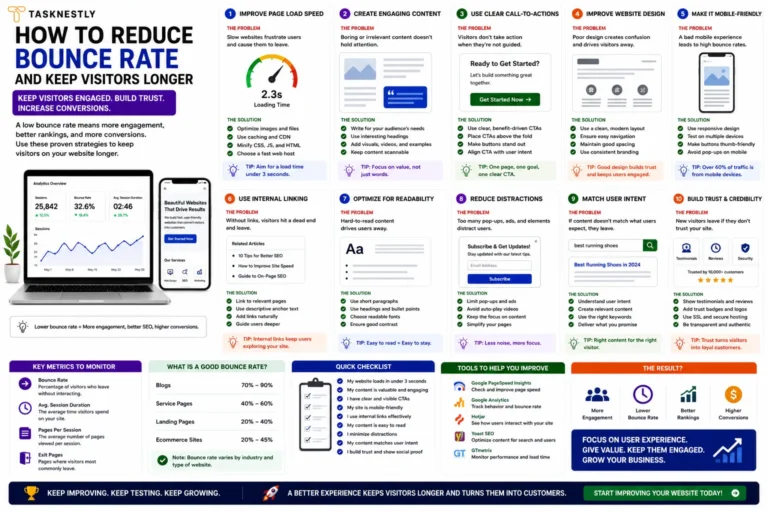
Page speed is among the most commercially significant website UX tips available. Every additional second of load time increases bounce rate and reduces conversion rate — and on mobile specifically, Google’s research shows that 53% of mobile site visits are abandoned if a page takes longer than three seconds to load. Improving page load speed is one of the highest-return website UX tips you can apply, because it improves the experience for every single visitor without requiring any changes to your content or design.
Mobile UX as a Sales Driver
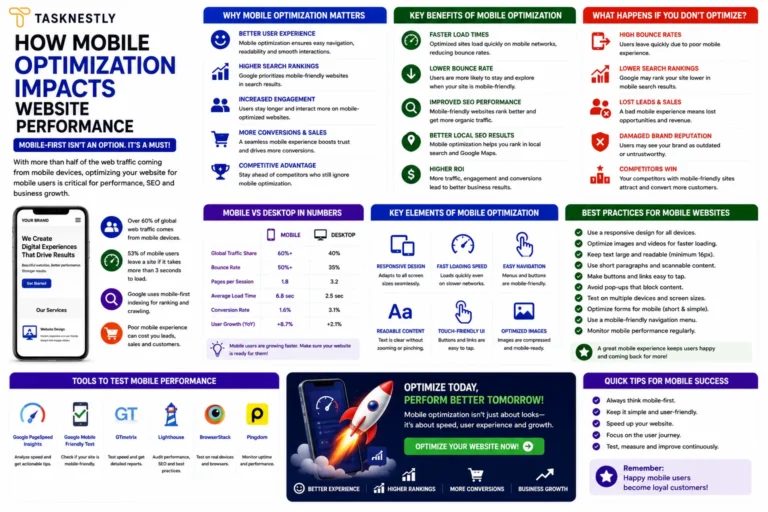
With mobile accounting for the majority of web traffic in 2026, mobile UX is not an afterthought — it is the primary UX challenge for most business websites. Website UX tips for mobile include: ensuring text is legible without zooming, making interactive elements large enough to tap comfortably, eliminating horizontal scrolling, prioritising above-the-fold content on small screens, and loading a lightweight version of the page that performs well on slower mobile connections. These website usability tips for mobile directly translate into higher engagement, lower bounce rates, and better conversion rates from your largest traffic source.
Struggling to convert mobile visitors? Let Tasknestly fix your UX. Our digital marketing team and web specialists optimise your site’s UX for every device, driving more leads from the traffic you already have. Request your free quote.
Your Site Should Be Converting More
Small fixes only go so far — Tasknestly builds and optimizes full websites designed to convert visitors into customers.
Get Website Services →How to Improve Website UX With Visual Hierarchy
Visual hierarchy — the deliberate arrangement of design elements to guide the visitor’s attention in a specific order — is one of the most powerful UX design tips for websites with real commercial intent. A strong visual hierarchy ensures that visitors see the most important information first, understand what action to take, and feel guided rather than overwhelmed by the page.
The F-Pattern and Z-Pattern: How Visitors Actually Read
Eye-tracking research has consistently shown that web visitors scan pages in predictable patterns — most commonly an F-pattern (reading across the top, then skimming down the left side) on text-heavy pages, or a Z-pattern (across the top, diagonal to the bottom left, then across the bottom) on image-heavy pages. Website UX tips that align your most important content — headline, key benefit, CTA — with these natural scan patterns ensure that critical information is seen even by visitors who do not read every word.
Use White Space Intentionally
One of the most underused website UX tips is the strategic use of white space — the empty space between design elements. Crowded pages feel overwhelming and make it harder for visitors to identify what matters most. Generous white space around key elements like headlines, CTAs, and product images creates visual clarity, draws attention to the element surrounded by space, and makes the overall experience feel premium and trustworthy. White space is not wasted space — it is the UX design tip that gives your content room to breathe and your visitors space to focus.
Your Site Should Be Converting More
Small fixes only go so far — Tasknestly builds and optimizes full websites designed to convert visitors into customers.
Get Website Services →Website Usability Tips for Forms and Checkout
Forms are the conversion point of most business websites — the moment where a visitor becomes a lead or a customer. Poorly designed forms are one of the most common sources of lost conversions, and website UX tips for form design are some of the most directly commercially impactful improvements available.
Reduce Form Fields to the Minimum Necessary
The single most effective website UX tip for improving form conversion rates is reducing the number of fields to the absolute minimum required. Every additional field you ask a visitor to complete increases friction and reduces completion rate. Ask yourself whether each field is truly necessary for the next step in your sales process — if you can follow up and collect additional information later, do not put it in the form now. Name, email, and a brief description of their need is sufficient for most B2B enquiry forms. More fields mean fewer completions and fewer leads.
Make Error Messages Helpful, Not Punishing
UX best practices for conversion on forms include designing error messages that guide rather than frustrate. When a visitor fills in a form incorrectly, the error message should tell them exactly what went wrong and exactly how to fix it — in plain language, adjacent to the specific field with the error, not as a generic message at the top of the page. This seemingly small website UX tip can meaningfully improve form completion rates because it removes the friction and frustration of error-fixing.
For independent reviews of the best form optimisation and CRO tools that complement these website UX tips, TechBothQ covers the leading conversion rate optimisation platforms with detailed comparisons.
Your Site Should Be Converting More
Small fixes only go so far — Tasknestly builds and optimizes full websites designed to convert visitors into customers.
Get Website Services →Website UX Tips for Building Trust Through Design
Trust is a UX variable as much as it is a marketing one. The design decisions you make signal either credibility or concern to every visitor — often before they have consciously registered a reaction. These website UX tips for trust-building translate design choices into commercial confidence.
Consistent branding across every page signals professionalism and reliability. When fonts, colours, imagery style, and tone of voice are consistent throughout your site, visitors develop confidence in your brand’s attention to detail. Inconsistency — different styles on different pages, mismatched colours, or a visual design that looks different from your social media presence — creates subtle doubt that undermines conversion.
Professional photography consistently outperforms stock imagery on trust metrics. Images of your real team, your real office, your real products, or your real clients signal authenticity in a way stock images simply cannot. If you invest in one UX improvement alongside the website UX tips in this guide, invest in a professional photography session for your business.
Clear, accessible contact information — a phone number, an email address, and a physical address if applicable — signals that your business is real, established, and accountable. Displaying this information prominently is one of the simplest and most effective website usability tips for businesses where trust is a purchase barrier. When visitors know they can reach a real person, their willingness to take the next step increases meaningfully.
Combining these website UX tips with professional branding services and a well-built website creates a cohesive digital presence that builds trust at every touchpoint — converting more of your traffic without any increase in your marketing spend.
Your Site Should Be Converting More
Small fixes only go so far — Tasknestly builds and optimizes full websites designed to convert visitors into customers.
Get Website Services →Website UX Tips for Ecommerce: Specific Considerations
Ecommerce websites have unique UX challenges that general-purpose website UX tips only partially address. If your business sells products online, these specific website UX tips for ecommerce will have the most direct impact on your revenue.
Product page UX is where most ecommerce conversions are won or lost. Website UX tips for product pages include: using multiple high-quality images from different angles, including a zoom feature for detail inspection, placing the add-to-cart button prominently above the fold, displaying stock levels to create urgency where genuine, and clustering all purchase-decision information — price, shipping time, returns policy — in one easily scannable section. These website UX tips reduce the hesitation that prevents product page visitors from completing their purchase.
Checkout UX is equally critical. A multi-step checkout that requires account creation before purchase is one of the most common ecommerce UX mistakes and one of the most significant sources of abandoned carts. Website UX tips for checkout universally recommend: offering guest checkout, minimising the number of steps, showing a clear progress indicator, and displaying trust signals (security badges, accepted payment methods, returns guarantee) directly adjacent to the payment fields.
Cart abandonment email sequences can recover some of the conversions lost to poor checkout UX, but the better investment is applying website UX tips to reduce abandonment in the first place. A smooth, fast, frictionless checkout experience is the highest-return UX improvement available to any ecommerce business — and Tasknestly’s ecommerce solutions are built around exactly these UX principles.
Top Tools to Help You Apply These Website UX Tips
- Hotjar — Heatmaps and session recordings that show exactly how visitors interact with your pages, making UX problems easy to spot and prioritise.
- Google PageSpeed Insights — Measures your page speed performance and Core Web Vitals scores, with specific recommendations for the technical UX improvements that will have the greatest impact.
- Maze — User testing platform that lets you test your website’s UX with real users and collect quantitative and qualitative feedback to validate your UX design decisions before implementing them.
Your Site Should Be Converting More
Small fixes only go so far — Tasknestly builds and optimizes full websites designed to convert visitors into customers.
Get Website Services →Frequently Asked Questions: Website UX Tips
| Question | Answer |
|---|---|
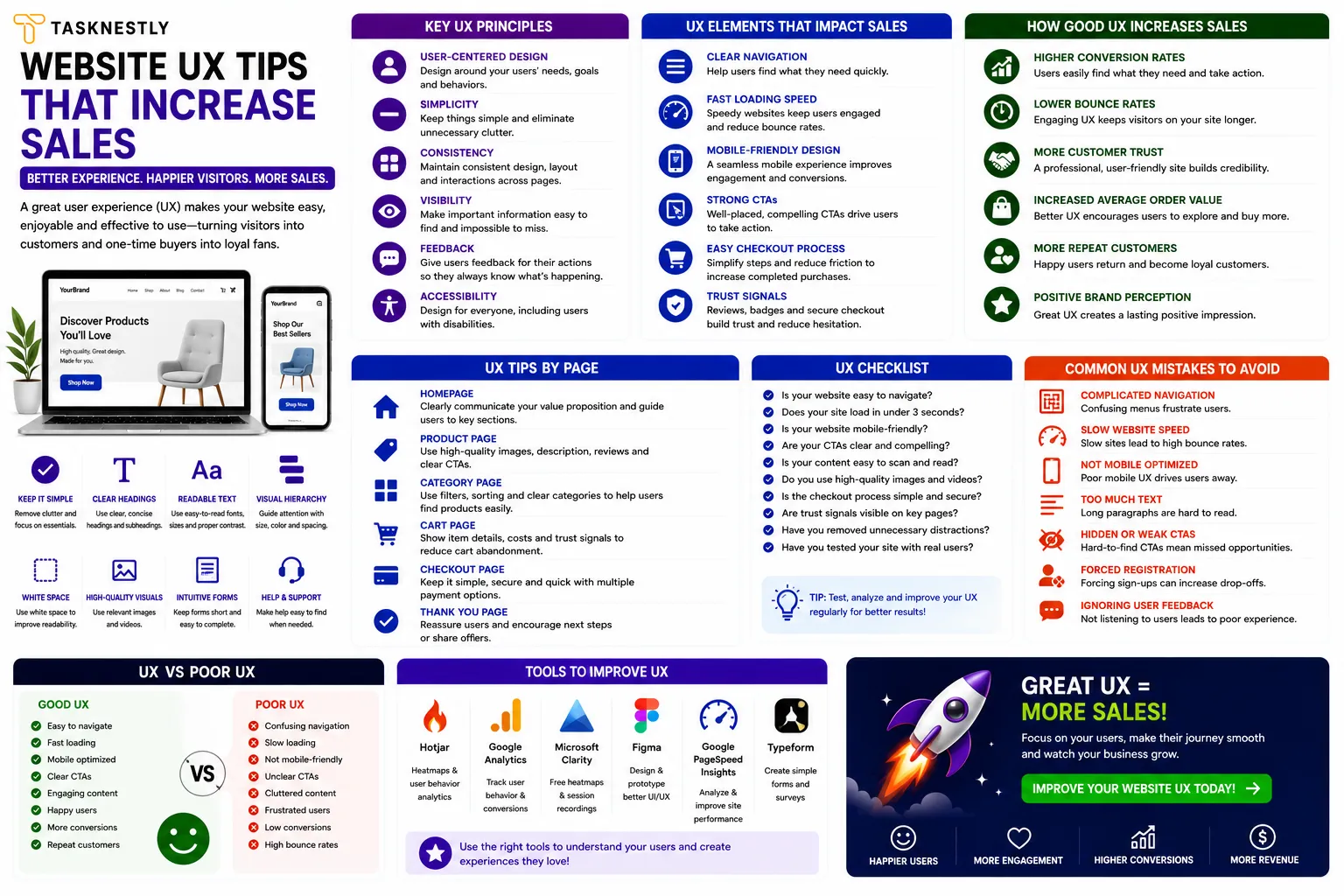
| What are the most important website UX tips for increasing sales? | The highest-impact website UX tips for sales are: communicate your value proposition within five seconds, reduce cognitive load in navigation, improve page speed, optimise for mobile, use clear visual hierarchy, and reduce form fields to the minimum necessary. |
| How does UX affect conversion rates? | UX directly determines whether visitors understand your offer, trust your brand, and find it easy to take the next step. Poor UX increases bounce rate and reduces conversion rate. Improving UX through these website UX tips consistently produces measurable conversion rate increases. |
| How do I improve my website’s user experience? | Start with the highest-impact website UX tips: test your site on mobile, measure your page speed with Google PageSpeed Insights, audit your navigation for simplicity and clarity, review your homepage headline for specificity, and add genuine social proof above the fold. |
| What is the relationship between UX and SEO? | UX and SEO are deeply connected in 2026. Google’s Core Web Vitals measure UX metrics directly. Bounce rate, dwell time, and engagement signals all influence rankings. Applying website UX tips improves both user experience and search performance simultaneously. |
| How often should I audit my website’s UX? | Conduct a UX audit quarterly using heatmap data, session recordings, and conversion analytics. Run user testing bi-annually. Treat UX as an ongoing investment rather than a one-time project — the website UX tips you implement today will need revisiting as your audience and offerings evolve. |
| Do website UX tips apply to mobile and desktop equally? | The principles are the same but the implementation differs significantly. Mobile UX requires larger touch targets, simplified navigation, faster load times, and prioritised above-the-fold content. Always test website UX tips on both mobile and desktop separately. |
| Can I improve website UX without a developer? | Many website UX tips can be implemented without development skills — improving copy clarity, adding testimonials, simplifying navigation, and optimising images are all achievable without code. Technical improvements like page speed and Core Web Vitals typically require developer involvement. |
Your Site Should Be Converting More
Small fixes only go so far — Tasknestly builds and optimizes full websites designed to convert visitors into customers.
Get Website Services →Conclusion: Apply These Website UX Tips and Turn Traffic Into Revenue
Website UX tips are not a luxury for large businesses with big design budgets — they are a commercial necessity for any business that wants its website to perform as a genuine growth asset. The UX improvements that matter most are not complex or expensive; they are disciplined applications of clarity, speed, trust, and intuition that make the visitor’s journey from arrival to conversion as smooth and natural as possible.
Start with the website UX tips that address your biggest current friction points. Run your site through Google PageSpeed Insights. View your site as a first-time visitor on mobile. Check whether your headline communicates your value proposition in under five seconds. Audit your navigation for unnecessary complexity. Reduce your form fields to the minimum. These website UX tips, applied consistently and tested systematically, will produce measurable improvements in your conversion rate and your revenue.
If you want expert support applying these website UX tips to your specific site — through a full UX audit, a redesign, or targeted improvements to your highest-traffic pages — Tasknestly’s web development and design team is ready to help. Get your free quote today and let us turn your website into a high-performing commercial asset.
Your Site Should Be Converting More
Small fixes only go so far — Tasknestly builds and optimizes full websites designed to convert visitors into customers.
Get Website Services →Grow With Tasknestly
Subscribe to the Tasknestly newsletter and get the latest tips on websites, SEO, social media, and digital growth.