
Website builders for small businesses have transformed what is possible for business owners without technical skills or large budgets. A decade ago, getting a professional website online required hiring a developer, waiting weeks, and spending thousands of pounds. Today, website builders for small businesses offer professional templates, ecommerce functionality, SEO tools, and mobile optimisation out of the box — allowing most business owners to get a polished, functional website live within days rather than months.
Choosing the right website builders for small businesses matters more than most people realise. The wrong choice can mean a platform that limits your growth, produces poor SEO performance, charges hidden fees, or locks you into a proprietary system that is difficult to migrate from later. The right website builders for small businesses give you a foundation that grows with you — flexible enough to expand, capable enough to convert, and affordable enough to sustain from day one.
This guide covers the best website builders for small businesses in 2026 — evaluated on ease of use, design quality, SEO capabilities, ecommerce features, customer support, and value for money. Whether you are building your first business website or migrating from an outdated platform, this comparison of website builders for small businesses will help you make a confident, informed decision.
Want a professionally built website without the limitations of a website builder? Tasknestly’s web design and development team builds custom websites engineered for performance, SEO, and conversion. Get your free quote today.
Your Site Should Be Converting More
Small fixes only go so far — Tasknestly builds and optimizes full websites designed to convert visitors into customers.
Get Website Services →Table of Contents
What to Look For in Website Builders for Small Businesses
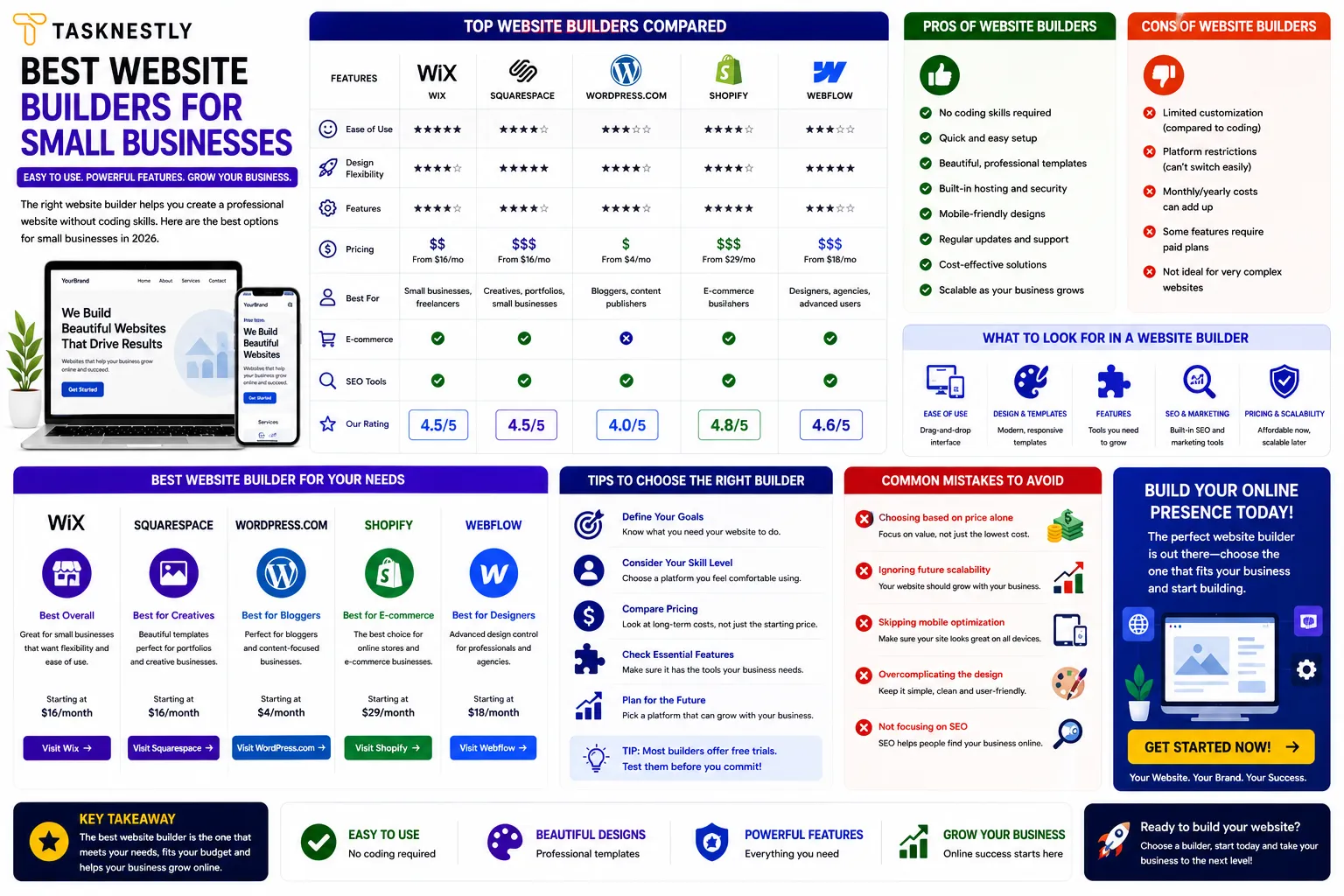
Before comparing specific platforms, it is worth establishing the criteria that matter most when evaluating website builders for small businesses. Not every business has the same priorities, but these are the dimensions that consistently determine whether a website builder serves a small business well or creates frustration down the line.
Ease of Use
Website builders for small businesses should be intuitive enough for a non-technical user to build and maintain a professional-looking site without needing coding knowledge. The best website builders for small businesses use drag and drop interfaces that make editing straightforward, offer a library of professionally designed templates, and provide clear guidance through the setup process. If you spend more time figuring out the builder than building your website, the platform is not serving you well.
SEO Capabilities
One of the most important and often overlooked criteria when evaluating website builders for small businesses is SEO performance. A beautiful website that nobody finds through search is a wasted asset. The best website builders for small businesses give you control over page titles, meta descriptions, URL structures, image alt text, and page speed — all critical SEO factors. Some website builders for small businesses also integrate with dedicated SEO tools or include built-in SEO scoring features.
Ecommerce Features
For small businesses selling products or services online, the ecommerce capabilities of website builders for small businesses are a key selection criterion. The best website builders for small businesses with ecommerce needs offer product catalogues, payment processing, inventory management, and checkout flow customisation without requiring third-party plugins or significant additional investment.
Your Site Should Be Converting More
Small fixes only go so far — Tasknestly builds and optimizes full websites designed to convert visitors into customers.
Get Website Services →The Best Website Builders for Small Businesses in 2026
| Platform | Best For | Starting Price | Ease of Use | SEO Strength | Ecommerce |
|---|---|---|---|---|---|
| Squarespace | Design-led small businesses | £11/mo | High | Good | Good |
| Wix | Versatile drag and drop | £8/mo | Very High | Good | Good |
| WordPress.com | Content and blogging | Free–£20/mo | Medium | Excellent | Via plugins |
| Shopify | Ecommerce-first businesses | £25/mo | High | Good | Excellent |
| Webflow | Design control without code | £12/mo | Medium | Excellent | Good |
| GoDaddy | Fast, simple setup | £7/mo | Very High | Moderate | Moderate |
Your Site Should Be Converting More
Small fixes only go so far — Tasknestly builds and optimizes full websites designed to convert visitors into customers.
Get Website Services →Squarespace: Best for Design-Led Small Businesses
Squarespace consistently ranks among the top website builders for small businesses that prioritise visual presentation. Its templates are among the most aesthetically polished available from any drag and drop website builder, making it particularly well-suited for creative professionals, portfolio businesses, restaurants, and lifestyle brands where visual first impressions drive conversion.
As a website builder for small businesses, Squarespace offers solid ecommerce functionality, built-in blogging, email marketing integration, and reasonably strong SEO controls. Its weakness relative to some competing website builders for small businesses is flexibility — the drag and drop experience is guided rather than fully freeform, which speeds up setup but can limit customisation for users with specific design visions.
Your Site Should Be Converting More
Small fixes only go so far — Tasknestly builds and optimizes full websites designed to convert visitors into customers.
Get Website Services →Wix: Best Easy Website Builder for Maximum Flexibility
Wix is the most popular drag and drop website builder globally and one of the most flexible website builders for small businesses that want genuine creative control without touching code. Its Editor X interface gives experienced users near-complete layout freedom, while its standard editor remains approachable enough for complete beginners. Wix’s app market also extends its functionality significantly, with hundreds of integrations covering booking systems, CRM tools, and ecommerce features.
As a cheap website builder for small business owners with limited budgets, Wix offers a free tier (with a Wix-branded subdomain) and paid plans starting at competitive price points. The main criticism of Wix as a website builder for small businesses is its SEO performance relative to WordPress — adequate but not best-in-class.
Your Site Should Be Converting More
Small fixes only go so far — Tasknestly builds and optimizes full websites designed to convert visitors into customers.
Get Website Services →WordPress.com: Best for SEO and Content-Heavy Sites
For small businesses where SEO and content marketing are the primary growth channels, WordPress.com (or self-hosted WordPress.org) is the most powerful option among website builders for small businesses. WordPress powers over 40% of all websites on the internet precisely because of its flexibility, its vast plugin ecosystem, and its outstanding SEO performance when properly configured.
As a website builder for small businesses focused on content marketing and long-term organic growth, WordPress offers capabilities that no other platform matches. Its SEO plugins (Rank Math, Yoast) give you granular control over every SEO element. Its plugin library extends functionality virtually without limit. Its open-source nature means no vendor lock-in.
The trade-off is a steeper learning curve than other website builders for small businesses on this list — WordPress is more powerful but less immediately intuitive than Wix or Squarespace for complete beginners. Many small businesses choose to have WordPress set up professionally rather than building from scratch themselves. For reviews of the best WordPress hosting platforms and performance tools, TechBothQ provides detailed independent comparisons.
Your Site Should Be Converting More
Small fixes only go so far — Tasknestly builds and optimizes full websites designed to convert visitors into customers.
Get Website Services →Shopify: Best Website Builder for Small Businesses Selling Products
For small businesses where ecommerce is the primary function, Shopify is the strongest of all website builders for small businesses. Its ecommerce infrastructure — payment processing, inventory management, shipping integrations, abandoned cart recovery, and multi-channel selling — is unmatched by general-purpose website builders for small businesses. The Shopify App Store provides thousands of extensions covering every ecommerce functionality a growing business could need.
Shopify is the more expensive option among website builders for small businesses, but for product-based businesses its ecommerce capabilities justify the investment many times over. Tasknestly’s ecommerce solutions frequently include Shopify builds for clients whose primary business model is direct product sales.
Your Site Should Be Converting More
Small fixes only go so far — Tasknestly builds and optimizes full websites designed to convert visitors into customers.
Get Website Services →Webflow: Best for Design Control Without Code
Webflow occupies a unique position among website builders for small businesses — it offers the design freedom of a custom-coded site through a visual interface, without requiring any programming knowledge. It is the preferred choice among design-aware founders and marketing teams who need precise layout control and outstanding SEO performance but do not have or want to rely on a developer for every design change.
As a website builder for small businesses with strong growth ambitions, Webflow’s SEO capabilities are genuinely excellent — giving you granular control over every technical SEO element. Its learning curve is steeper than Wix or Squarespace, making it better suited to small businesses with some design background or a dedicated marketing resource who can invest time in learning the platform.
Your Site Should Be Converting More
Small fixes only go so far — Tasknestly builds and optimizes full websites designed to convert visitors into customers.
Get Website Services →GoDaddy Website Builder: Best for Fastest Setup
For small businesses that simply need a professional presence online as quickly as possible with minimal setup friction, GoDaddy’s website builder is the fastest and most accessible of all the website builders for small businesses on this list. Its AI-powered website creation tool generates a complete draft site in minutes based on a few prompts about your business. It is not the most powerful or the most flexible website builder for small businesses, but for service businesses that need a credible online presence without complexity, it delivers exactly what it promises.
Getting a professionally built website gives you advantages no website builder can match. Tasknestly’s website design and development team builds fully custom, conversion-optimised websites backed by SEO strategy and digital marketing expertise. Book your free quote.
Your Site Should Be Converting More
Small fixes only go so far — Tasknestly builds and optimizes full websites designed to convert visitors into customers.
Get Website Services →When Website Builders for Small Businesses Are Not Enough
Website builders for small businesses are excellent tools for getting a professional online presence live quickly and affordably. But they have limitations that become apparent as businesses grow and their needs become more specific.
The most common limitation of website builders for small businesses is design inflexibility. Template-based platforms constrain your ability to create truly unique experiences that stand apart from competitors using the same platform. When your brand has specific requirements — a custom booking flow, a complex filtering system, a tailored ecommerce experience — website builders for small businesses often cannot deliver without significant workarounds or third-party integrations that add cost and complexity.
Performance is another area where website builders for small businesses often fall short of custom-built alternatives. Many of the popular website builders for small businesses produce pages with heavier code than a lean custom build, which can negatively affect page speed scores, Core Web Vitals performance, and ultimately SEO rankings. For small businesses where search visibility is a growth priority, a custom WordPress build optimised for performance often outperforms a website builder for small businesses in organic rankings over time.
When your business has outgrown what website builders for small businesses can offer, working with a professional web development team is the natural next step — and it often delivers a significantly better commercial return than continuing to work within the constraints of a builder platform.
Your Site Should Be Converting More
Small fixes only go so far — Tasknestly builds and optimizes full websites designed to convert visitors into customers.
Get Website Services →How to Get the Most From Website Builders for Small Businesses
Choosing the right platform is only the first step. Getting the most from website builders for small businesses requires treating the website as a live, evolving asset rather than a one-time project.
Update your content regularly. Search engines favour websites that publish fresh, relevant content — and website builders for small businesses make this easy through blog functionality and page editing tools. Even adding a new service page, case study, or blog post once a month keeps your site active and gives Google more content to index and rank.
Use your platform’s analytics integration. Most website builders for small businesses integrate with Google Analytics either natively or through a simple plugin. Setting this up from day one means you have the data to understand where visitors come from, which pages they visit, and where they drop off — information that is invaluable for improving your site’s performance over time.
Plan for growth from the start. The best website builders for small businesses are the ones that can scale with your business — adding new pages, new products, new team members, and new functionality without requiring a full rebuild. Evaluate your top two or three platform options not just for what you need today but for what you are likely to need in two years.
Your Site Should Be Converting More
Small fixes only go so far — Tasknestly builds and optimizes full websites designed to convert visitors into customers.
Get Website Services →Key Features Every Small Business Website Needs
Regardless of which website builders for small businesses you choose, there are non-negotiable features every small business website should include. Understanding these requirements before you select a platform helps you avoid building on a foundation that cannot support what you need.
A clear contact pathway is essential — whether a contact form, a phone number prominently displayed, or a booking system integrated into the site. Website builders for small businesses vary considerably in how easily they support contact and booking integrations, so verify this before committing to a platform. For service businesses, a frictionless way for visitors to get in touch is often the most commercially important feature on the entire site.
A mobile-optimised design is non-negotiable in 2026. All the major website builders for small businesses produce mobile-responsive templates by default, but you should still preview and test your site on mobile before publishing — some templates adapt better than others, and custom edits can sometimes break mobile layouts in ways that are not obvious in the desktop editor.
A clear value proposition on the homepage is equally critical. Your homepage should communicate what you do, who you help, and why you are the best choice — within five seconds of landing. Most website builders for small businesses offer homepage templates with this structure built in, but filling those templates with genuinely compelling, customer-focused copy is the difference between a website that converts and one that simply exists.
An SSL certificate (the padlock icon that gives your site an https:// URL) is required for security, SEO, and user trust. All reputable website builders for small businesses include SSL as standard. If the platform you are considering does not include SSL in the base plan, treat this as a red flag.
Finally, fast load speed matters regardless of which website builders for small businesses you use. Test your chosen platform’s template with your actual content loaded — not just the demo — using Google PageSpeed Insights before committing to it long-term. Some website builders for small businesses produce significantly heavier code than others, and that performance difference compounds into meaningful SEO and conversion differences over time. The website development expertise Tasknestly brings to custom builds ensures these fundamentals are addressed from day one — not retrofitted later.
Best Free and Affordable Tools to Complement Your Website Builder
- Google Search Console — Free tool to monitor your website’s SEO performance, fix indexing issues, and track which keywords are driving traffic — essential regardless of which website builder you use.
- Canva — Design professional graphics, banners, and social media assets that match your website’s visual identity without needing a graphic designer.
- Mailchimp — Free-tier email marketing platform that integrates with most website builders for small businesses to build and manage your customer email list from day one.
Your Site Should Be Converting More
Small fixes only go so far — Tasknestly builds and optimizes full websites designed to convert visitors into customers.
Get Website Services →Frequently Asked Questions: Website Builders for Small Businesses
| Question | Answer |
|---|---|
| What is the best website builder for small businesses in 2026? | The best website builder depends on your needs. Wix is best for flexibility and ease. Squarespace is best for design. WordPress is best for SEO and content. Shopify is best for ecommerce. Webflow is best for design control without code. |
| Are website builders for small businesses good for SEO? | Most website builders for small businesses offer adequate SEO controls, but WordPress significantly outperforms the others for SEO when properly configured. Wix and Squarespace are improving but still trail WordPress in technical SEO capability. |
| What is the cheapest website builder for small businesses? | GoDaddy and Wix offer the lowest starting prices among the major website builders for small businesses. Both have free tiers or trials. WordPress.com also has a free tier, though most small businesses will need a paid plan for a professional result. |
| Can I build my own website without technical skills? | Yes. Wix, Squarespace, and GoDaddy are specifically designed to be easy website builders that require no technical knowledge. Drag and drop website builder interfaces make it possible to build a professional site in hours without any coding. |
| Should I use a website builder or hire a professional? | Website builders for small businesses are ideal when you are starting out, have a limited budget, and need a straightforward online presence. Professional website development is better when you need custom functionality, outstanding SEO performance, or a truly unique brand experience. |
| Do website builders for small businesses include hosting? | Yes — all the major website builders for small businesses include hosting in their subscription price. You do not need to arrange separate hosting unless you are using self-hosted WordPress (WordPress.org), which requires independent hosting. |
| Which website builder is best for ecommerce? | Shopify is the strongest ecommerce option among website builders for small businesses. Wix and Squarespace also offer ecommerce features suitable for smaller product catalogues. For serious ecommerce growth, Shopify or a custom WooCommerce build on WordPress are the recommended options. |
Your Site Should Be Converting More
Small fixes only go so far — Tasknestly builds and optimizes full websites designed to convert visitors into customers.
Get Website Services →Conclusion: Choose the Right Website Builder for Small Businesses and Get Online
The best website builders for small businesses give you a professional, functional, and SEO-ready online presence without requiring a large budget or technical expertise. The right choice among website builders for small businesses depends on your specific priorities — if design matters most, choose Squarespace; if flexibility matters most, choose Wix; if SEO matters most, choose WordPress; if ecommerce matters most, choose Shopify.
Whatever platform you choose from the website builders for small businesses available in 2026, the most important thing is to get a quality website live and start building your digital presence. A good website on an imperfect platform is infinitely more valuable than a perfect website that never gets built.
If you have outgrown what website builders for small businesses can offer — or if you want to start with a custom-built website that outperforms any builder from day one — Tasknestly’s web development specialists are ready to help. Get your free quote today and let us build the website your business deserves.
Your Site Should Be Converting More
Small fixes only go so far — Tasknestly builds and optimizes full websites designed to convert visitors into customers.
Get Website Services →Grow With Tasknestly
Subscribe to the Tasknestly newsletter and get the latest tips on websites, SEO, social media, and digital growth.